![]() |
| Ken, Nancy, Tim, Sarah |
Jan 6, 2021
GBM Brain Cancer
Nov 17, 2020
Raspberry Pi 64 bit OS Boot from USB
![]() |
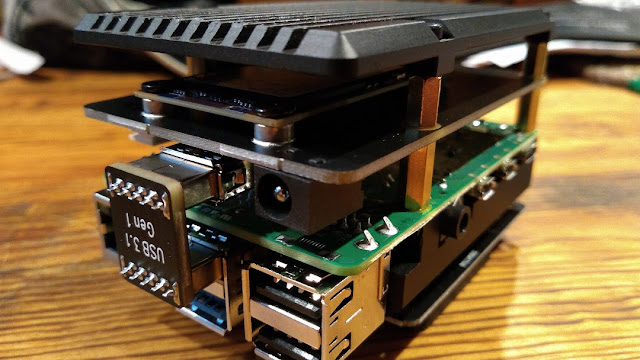
| The X857 mSATA shield makes a nice, clean package for a USB boot Raspberry Pi 4 with SSD |
For some time now, I have been trying to get the Raspberry Pi 4 to boot from USB. A couple reason to make this change are, the integrity of SSD over the SD card is substantial, and of course the benefit of greater data transfer speeds.
As more Pi fans jump on this wagon, hardware is becoming available for this specific upgrade. One example of this is the Gookworm X857 mSATA shield for the Raspberry Pi 4. This fits directly under the Pi 4 and connects with one of the USB-3 ports. Under the shield, I mounted a 120 GB mSATA SSD.
To boot from USB on a Raspberry Pi 4 (4GB or 8GB), install the new Raspberry Pi 64 bit OS and the USB boot configuration will be exceptionally easy. Here are the simple steps to follow.
- Download, install, and update the Raspberry Pi 64 bit OS to a SD card
- Copy the SD card to a SSD and connect the SSD to the Raspberry Pi 4 USB-3
- Open Raspberry Pi Imager, write Raspberry Pi 4 EEPROM boot recovery to a clean SD card
- Shut down, remove the OS SD card, insert the EEPROM boot recovery SD card
- With the SSD connected to a USB 3, and the EEPROM SD card in, power up the Raspberry Pi
- A constant, fast flashing green LED and green screens means it worked
- Shut down, remove the SD card, and restart
- Grin at your new USB boot Raspberry Pi 64 bit system

Nov 13, 2020
Fusion
My first experience with System Fusion came not long after I purchased a Yaesu FT-991A. My intention was only to upgrade my HF rig, but then I thought the addition of the 144/440 SSB, FM, and C4FM in a single transceiver may open some new avenues to explore.
Since I couldn't use YSF locally, I decided to program the 991A with all repeaters in a 50 mile radius of home and then find which of those might be YSF. I found a few, but one of them was well within reach, the W9RH repeater in Milwaukee, running YSF in Automatic Mode Select (AMS) and with WIRES-X connectivity. A few minutes later, with amazing clarity and no analog static, I began listening to a QSO between Milwaukee, Illinois, and Minnesota hams on YSF over the WIRES-X linking system. A short time later, I was on the air with YSF and loving it.
As digital radio and codec technology continues to advance, such as with WIRES-X, MMDVM hotspots and repeaters, and the new AMBE servers, access to world-wide digital mode communication is almost taken for granted. These advances in digital voice technology have helped bring new amateur radio enthusiasts into the fold more than ever before.
Yaesu System Fusion (YSF) is a mode - A proprietary mode of modulation based on Continuous Four-Level Frequency Modulation (C4FM), which is a type of Four Frequency Shift Keying (4FSK), based on Frequency Division Multiple Access (FDMA). More can be found here on Yaesu's System Fusion page.
WIRES-X is a network - A closed proprietary network of interlinked HRI-200 digital nodes, Yaesu C4FM digital repeaters, and Yaesu C4FM digital radios, all carried over Yaesu servers hosting network "rooms" or talk groups. More can be found on Yaesu's WIRES-X page.
While being a closed proprietary network, WIRES-X can be bridged to other networks like the YSF network and FCS network, but other networks cannot bridge into the WIRES-X network.
So how do you program "codeplugs" for your YSF radio? You don't. It's just a mode, not a mode and network. No color codes, or groups, or channels, or time slots to program. Simply push a button to turn it on or turn it off.
YSF Tips
FT-70D
Stop the squeal/squelch after receive from hotspot. Long-press the AMS button to turn off AMS.
updated: 11/13/2020