Showing posts with label Cooler. Show all posts

Nov 17, 2020

Raspberry Pi 64 bit OS Boot from USB

The X857 mSATA shield makes a nice, clean package for a USB boot Raspberry Pi 4 with SSD

For some time now, I have been trying to get the Raspberry Pi 4 to boot from USB. A couple reason to make this change are, the integrity of SSD over the SD card is substantial, and of course the benefit of greater data transfer speeds. 

As more Pi fans jump on this wagon, hardware is becoming available for this specific upgrade. One example of this is the Gookworm X857 mSATA shield for the Raspberry Pi 4. This fits directly under the Pi 4 and connects with one of the USB-3 ports. Under the shield, I mounted a 120 GB mSATA SSD. 

To boot from USB on a Raspberry Pi 4 (4GB or 8GB), install the new Raspberry Pi 64 bit OS and the USB boot configuration will be exceptionally easy. Here are the simple steps to follow.

  1. Download, install, and update the Raspberry Pi 64 bit OS to a SD card
  2. Copy the SD card to a SSD and connect the SSD to the Raspberry Pi 4 USB-3
  3. Open Raspberry Pi Imager, write Raspberry Pi 4 EEPROM boot recovery to a clean SD card
  4. Shut down, remove the OS SD card, insert the EEPROM boot recovery SD card
  5. With the SSD connected to a USB 3, and the EEPROM SD card in, power up the Raspberry Pi
  6. A constant, fast flashing green LED and green screens means it worked
  7. Shut down, remove the SD card, and restart
  8. Grin at your new USB boot Raspberry Pi 64 bit system
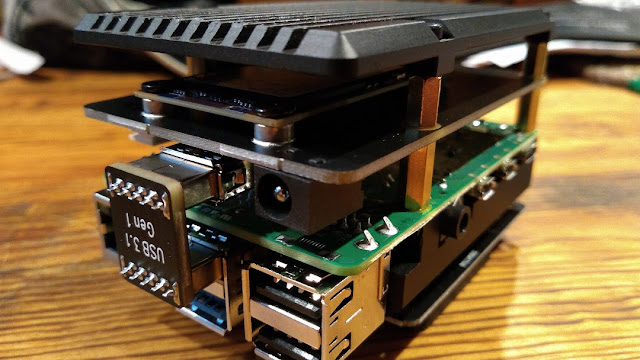
The mSATA drive installed with the armor case bottom (upside down)

Oct 4, 2020

Raspberry Pi Cooler


Ever since the Raspberry Pi 4 came out, there has been concern of the CPU and board overheating, and rightly so. After trying many cooling configurations, I finally landed on a cool answer to this hot problem, with great success.

The pictured heat sink armor case is the fan-less version by Geekworm. I believe it may be sold under several other names as well. There is a dual-fan version of this case, but based on personal experience, I would not recommend using it because the fans are junk and the fan wiring prohibits the use of hats on the GPIO pins.

This Argon Artik fan is a very quiet, programmable fan hat set on an extended GPIO so it clears the case nicely. In this configuration, the RPi 4 CPU temps have never gone above 43 degrees Celsius, and the fan speed has not yet run higher than 10%, or at least the 25% LED indicator. I haven't timed the fan cycle, but it's off far more than it's on, which should lead to a nice long fan life. Custom programming provides a scaled response to CPU temperature rise. I programmed this to:

  • 43 C, fan on 10%
  • 45 C, fan on 25%
  • 50 C, fan on 50%
  • 55 C, fan on 75%
  • 60 C, fan on 100%


As you can see from the photo, a second hat can be mounted nicely on top of the fan using a male/male pin set. Here, a ZUM Radio repeater controller is mounted on top, and the fan works flawlessly cooling the Pi as well as the repeater controller. An RTC or other less-than-full-size hat may be a little awkward, but for the big boards, it's a go.

Raspberry Pi 3 model B+ with the same setup works fan-tastic

How much do I like this setup? I have the same thing on all of my RPi's, and I must say, this makes for one cool Raspberry Pi!

GOTA

updated: 10/05/2020

Sep 22, 2020

Raspberry Pi APRS with SDR


For complete information on this project, see the APRS page.

While experimenting with the Raspberry Pi 3B+ APRS receiver, the Pi is temporarily running Gqrx SDR software with an AFSK1200 decoder. 

How does the RPi 3B+ handle the demand of processing with the SDR? The CPU is averaging a pretty busy 55% load. The Argon programmable fan is doing a good job keeping everything cool as it cycles on at 42C with 10% fan speed, and off at 38C. The fan cycle time is about 1:3 minutes on/off in a 69F degree environment. 

In comparison, monitoring the CPU load on the K9KMS MMDVM repeater while it's in use (not idle), I found it to be less than a 2% load. This MMDVM repeater runs on a Raspberry Pi 4B, so it's not exactly an apples-to-apples comparison, but running the Gqrx software to get the APRS data is obviously much more demanding. This will likely result in a shorter life expectancy for the RPi using this approach, so scratch Gqrx off the list and find something to process data, not radio frequency.

On Sep 21, 2020 at 17:39 UTC, the decoder ran until 00:30 (6+ hours) and logged 1,029 hits, an average of 171.5 hits per hour. Not too bad considering the surrounding forest and lowland lakefront area.

Read about this project's exciting continuation on the APRS page!


Sep 3, 2020

FT-7900R ZUM Repeater Build - Part 3


Over the last two weeks, I have been experimenting with various settings on the FT-7900R ZUM Radio Pi-Star repeater. After going through frequency calibrations, TX delay and TX/RX offset settings, I'm still having an issue with one particular thing.

The Problem


I have been unable to mitigate what seems to be a delay in the digital processing. This occurs after releasing the PTT of a transmitting radio. A short <1 second clip of the last transmission is heard coming back over the transmitting radio from the repeater. If you have ever heard a short-path long-path echo, you know what I'm trying to describe. It's more annoying than anything else, but something I'd rather not have happening, if at all possible.

Having gone through everything I could think of with the Pi-Star software settings (a short list for me), I began looking at hardware. Everything appeared to be working as it should, but then I had a light-bulb moment: "Maybe it really is a signal processing-induced delay."

Modification


The repeater is built around a Raspberry Pi 3 B+ that I once used as a desktop computer, even though it was pretty slow. When the Raspberry Pi 4 came out, I made the 3B to 4B change, and Wow! What a difference in performance! So if it made such a huge difference in a desktop environment, I wonder what it will do in a repeater controller environment. There's one way to find out.

A few minutes later, I had the Rpi 3 B+ disconnected from the ZUM Radio controller and replaced with a Raspberry Pi 4 B 2GB fitted with a full heat sink case and Argon programmable fan. I swapped out the Raspberry Pi OS card with a back-up copy of the Pi-Star repeater image and in under five minutes, the repeater was up and running.

Result


Almost any reasonable thing is worth trying when you are experimenting. For this repeater project, it has been a little of this. a little of that, old parts, spare parts, and a lot of fun. As for the Raspberry Pi 3 B+ to 4 B computer swap, I hear no perceptible difference with the original delay echo problem.

Hey, if nothing else, it looks like the blinking LED on the USB/Serial converter for the Nextion display is blinking a little faster, but that could just be me. So for now, I'll leave it with the Rpi 4 B and monitor the CPU temperature and Argon fan activation cycle frequency for a while.

New Hypothesis


Maybe the delay echo is caused by the collinear antenna setup feeding back, even running at very low power. I guess I'll find out when I get my frequency allocations from the Wisconsin Association of Repeaters and get a duplexer ordered, tuned, and installed.