Showing posts with label Raspberry Pi 4. Show all posts

Nov 17, 2020

Raspberry Pi 64 bit OS Boot from USB

The X857 mSATA shield makes a nice, clean package for a USB boot Raspberry Pi 4 with SSD

For some time now, I have been trying to get the Raspberry Pi 4 to boot from USB. A couple reason to make this change are, the integrity of SSD over the SD card is substantial, and of course the benefit of greater data transfer speeds. 

As more Pi fans jump on this wagon, hardware is becoming available for this specific upgrade. One example of this is the Gookworm X857 mSATA shield for the Raspberry Pi 4. This fits directly under the Pi 4 and connects with one of the USB-3 ports. Under the shield, I mounted a 120 GB mSATA SSD. 

To boot from USB on a Raspberry Pi 4 (4GB or 8GB), install the new Raspberry Pi 64 bit OS and the USB boot configuration will be exceptionally easy. Here are the simple steps to follow.

  1. Download, install, and update the Raspberry Pi 64 bit OS to a SD card
  2. Copy the SD card to a SSD and connect the SSD to the Raspberry Pi 4 USB-3
  3. Open Raspberry Pi Imager, write Raspberry Pi 4 EEPROM boot recovery to a clean SD card
  4. Shut down, remove the OS SD card, insert the EEPROM boot recovery SD card
  5. With the SSD connected to a USB 3, and the EEPROM SD card in, power up the Raspberry Pi
  6. A constant, fast flashing green LED and green screens means it worked
  7. Shut down, remove the SD card, and restart
  8. Grin at your new USB boot Raspberry Pi 64 bit system
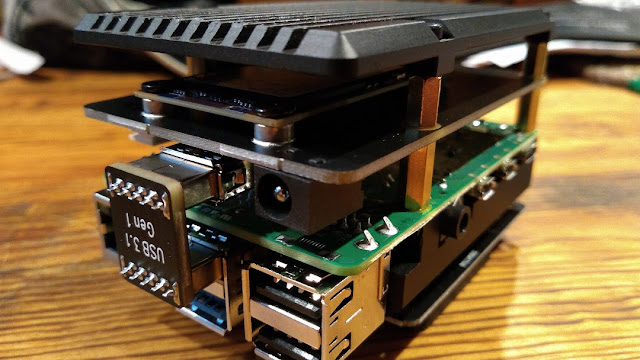
The mSATA drive installed with the armor case bottom (upside down)

Oct 4, 2020

Raspberry Pi Cooler


Ever since the Raspberry Pi 4 came out, there has been concern of the CPU and board overheating, and rightly so. After trying many cooling configurations, I finally landed on a cool answer to this hot problem, with great success.

The pictured heat sink armor case is the fan-less version by Geekworm. I believe it may be sold under several other names as well. There is a dual-fan version of this case, but based on personal experience, I would not recommend using it because the fans are junk and the fan wiring prohibits the use of hats on the GPIO pins.

This Argon Artik fan is a very quiet, programmable fan hat set on an extended GPIO so it clears the case nicely. In this configuration, the RPi 4 CPU temps have never gone above 43 degrees Celsius, and the fan speed has not yet run higher than 10%, or at least the 25% LED indicator. I haven't timed the fan cycle, but it's off far more than it's on, which should lead to a nice long fan life. Custom programming provides a scaled response to CPU temperature rise. I programmed this to:

  • 43 C, fan on 10%
  • 45 C, fan on 25%
  • 50 C, fan on 50%
  • 55 C, fan on 75%
  • 60 C, fan on 100%


As you can see from the photo, a second hat can be mounted nicely on top of the fan using a male/male pin set. Here, a ZUM Radio repeater controller is mounted on top, and the fan works flawlessly cooling the Pi as well as the repeater controller. An RTC or other less-than-full-size hat may be a little awkward, but for the big boards, it's a go.

Raspberry Pi 3 model B+ with the same setup works fan-tastic

How much do I like this setup? I have the same thing on all of my RPi's, and I must say, this makes for one cool Raspberry Pi!

GOTA

updated: 10/05/2020

Aug 15, 2020

FT-7900R ZUM Repeater Build - Part 2


October of last year I set out to make a MMDVM repeater with my Yaesu FT-7800 and FT-7900 transceivers. At the time, the setup was in simplex mode as I researched duplexers for the two frequency, one antenna system. And there the project sat in the shack just taking up space and collecting dust. With my invested time accumulating and the research folder growing thicker, I found several characteristics about my repeater build that I decided to change.

Enclosures and Heat


In the former computer case with all the components situated side by side, the homebrew repeater occupied a large footprint in the shack. Taking a second look at this, with the transceivers being the same size and short in height, stacking them greatly reduces the required footprint.

Since my components already have protective cases on them, placing everything into yet another case is unnecessary and only inhibits heat dissipation. In the stacked configuration with the receive radio on top, mounting them on a single Yaesu SMB-201 cooling fan will allow better open-air circulation as well as direct fan cooling to the bottom of the transmitting radio's heat sink.


Power


For now, I am keeping the repeater in the shack, so a second power supply is not needed. My Yaesu FP-1030A has more than enough capacity to run the repeater while also running my FT-991A, FTM-7250, and a few other accessories. If and when the time comes to move it out, I have a 23 amp power supply with an attached RIGrunner 4004U ready to go. This will not only power the two radios, but the RPi controller as well with it's two USB 5 volt ports. Handy dandy cotton candy!
Raspberry Pi Cooling

The Raspberry Pi 3B+ and ZUM Radio GPIO hat setup I originally made was satisfactory, but a passive cooling setup would be better. To fix this, I put the RPi in an aluminum heat sink case, added a programmable Argon One Artik fan hat on an extended GPIO, and placed the ZUM Radio board on top of that. I placed the Pi setup on it's side (GPIO edge down) to allow better natural airflow up the warm faces.

My three other Raspberry Pi 4B's require cooling so each have an Argon One fan, but in this 3B+ application it really isn't necessary, though it's a nice feature to have if things do get too warm. I programmed the fan to turn on at 42 degrees C at 10% speed. With this, the fan rarely activates, and then only briefly. The higher quality fan, reduced run time, and modified speed should greatly extend the life if this setup. After watching this setup for some time, I found the Pi temperature stays around 39 C with only passive cooling.

Here, the MMDVM repeater RPi is on the left of my shack's four-Pi setup. All computers are on a LAN switch to help reduce RF exposure in the shack.


Wiring Harness


One thing I don't like is having a harness that's too long or too short for whatever the project is, especially in the shack where extra wires can turn into interference-producing antennas. For this reason, I modified the harness and made two ends using two standard RJ45 jacks. The DIN cables were shortened to 16 inches and combined into a single RJ45. The repeater board connection was also joined to a single RJ45 jack. The two components now connect together with a standard computer network cable of whatever length is needed for the components' location. Perfect!


Antennas


The biggest change of plans may forgo the use of a duplexer and single antenna setup. Instead, I may go with a less expensive collinear setup using two Diamond X50 antennas mounted on separate tower standoff arms. I've been running a similar setup at 5 watts for a short time and found it works quite well. So far, I have one LMR400-fed antenna up and working on the tower arm.


Considering my location in a tall forested lakefront area widely known as a difficult corridor for RF, and having a tower only 55 feet tall, there is no point in spending a lot of money on any setup here. Besides, this is for experimentation and just having fun with RF. That's a big part of what this is all about, right?

Nextion Screen


Having all this figured out left me with a little unused creativity, so I redesigned my Nextion screen appearance and layout. Thanks to WA6HXG for the original Nextion 3.2 HMI file, I just moved a few things around, changed the fonts and background images, and called it a day. The colors in this photo are off, but you get the idea. Still on the to-do list are: (1) purchase and install the X50 antennas, and (2) receive frequency allocation from Wisconsin Association of Repeaters.


Jul 7, 2020

Updated Shack - Episode II


I thought I was done making changes and additions to the shack, but I guess not. Just as summer arrives, so too, some new things have arrived at the shack.

The first addition to the shack is a Heil PR781 mic mounted on a PL2T boom, with a Pro 7 PTT hand button. The CC-1-YM wire harness connects everything to my Yaesu FT-991A. Using the equalizer settings suggested by Bob Heil, the audio reports are very favorable to this setup. Thanks Bob!


The second addition is KF7P combo antenna tower standoff arm which now suspends the center of my trusty old Barker & Williamson BWD-90 folded dipole antenna in a flat-top configuration at 40 feet. The antenna's heading is 140-320 degrees. So far, signal reports have been very good, but no DX attempts as of yet. Field Day, 13 Colonies and other special events, and POTA stations have been my focus for most of June. The 10 meter openings afforded fantastic QSO's all over the USA. A review of my log should help map out what the antenna is doing in it's current configuration and location.

The third addition is an MFJ-4712RC remote antenna switch between the BWD-90 folded dipole and the GAP Titan DX. It is interesting switching back and forth between each antenna and hearing their different characteristics. The folded dipole is far quieter and much better at pulling out even the quietest of signals. Love that Barker and Williamson BWD-90!

The Raspberry Pi computers also got an update. The 8G and 4G RPi's now sport an Argon Artik fan hat on top of a Geekworm heat sink armor case. Talk about nice! The fan hats are programmable for temperature and fan speed settings in custom configurations. I set mine to run 10% at 43 C, 25% at 47 C, 50% at 50, 75% at 53 C, and 100% at 56 C. With the huge Geekworm heat sink, the fan hat runs maybe every five minutes for a short time, even with the RTL-SDR dongle running the CPU with a constant 20-30% load. And with temps never getting above 43 C and the large fan running at only 10% every time it turns on, they are extremely quiet. No more worrying about heat on a Raspberry Pi 4!


The latest addition is the software package Barrier from the Raspberry Pi OS repositories. Super simple to set up and run, this package allows me to run my two (or more) desktop Raspberry Pi computers from one keyboard and mouse setup. Simply slide the mouse cursor to the edge of the screen, and it seamlessly goes to the other computer and screen. My small desk space just got a lot bigger with only one keyboard and mouse on it! Amazing! Open a terminal and run sudo apt install barrier on each computer. Select one as a server and the rest as terminals. Details here.


May 10, 2020

Updated Shack - Episode I


The planet earth has seasons, and that's a good thing because who can take twelve months of winter? I go through seasons too, probably just like you. Sometimes I get kind of bored with things and just need a change. Other times, after using something for a while, I get to a certain level of frustration that I ask myself, "Why do I put up with this?". Then the creative juices begin to flow and my tiny Shack gets an update!

I decided to take my credenza and add a small shelf to the front to hold a keyboard or two. Then I added a small back-angled shelf on top to hold the radios and allow small storage under the radios. Lastly, I added a back panel to mount two monitors, an antenna selector switch (behind the right monitor), and a RigRunner 4007U (below the monitors). The HP VH240a HDMI monitors with built-in speakers are mounted with Mount-It! MI-2829 tilt-swivel brackets. Two large pass-through holes at the base of the back panel put all wiring behind the credenza for a nice, clean install. A small shelf up top is home for the HTs, the ZUMspot and some other small things.

The shack is now run entirely on a Raspberry Pi 4B 4GB with the latest Raspberry Pi OS. The Debian Ham radio bundle which includes CQRLOG, JS8Call, WSJT-X, FreeDV, and a few other helpful programs, drive my USB connected Yaesu FT-991A. A Rowetel SM1000 sits to the right of the FT-991A. Also pictured is a Yaesu FTM-7250DR, and my old FT-7800R which will be trading places with my less-old FT-7900R, now used for local repeaters and simplex in my workshop.

Right now, I am quite content with this setup. But yes, I still have to get the old Barker & Williamson BWD-90 folded dipole up for HF. I like the GAP Titan DX, but verticals are so noisy compared to the folded dipole. And then I should probably do this, and maybe do that, or maybe just... be content!

So now I can enjoy Ham radio again at my tiny new shack. And then the next season will come. Change can be good, and God is always good!


Aug 21, 2019

CQRlog


"CQRLOG is an advanced ham radio logger based on MySQL database. Provides radio control based on hamlib libraries (currently support of 140+ radio types and models), DX cluster connection, online callbook, a grayliner, internal QSL manager database support and a most accurate country resolution algorithm based on country tables created by OK1RR. CQRLOG is intended for daily general logging of HF, CW & SSB contacts and strongly focused to easy operation and maintenance." cqrlog.com

CQRlog 2.5.2 on Linux Mint 21.3

A couple years ago, I wrote about several Windows-based and web-based logging software systems for amateur radio enthusiasts. The web-based software provides users the option of using any OS, as all that is needed is a web browser, but on the downside, you also need an internet connection.

Long ago, while looking to get off the Windows bandwagon, I experimented with Linux, Redhat, and a few other OS's, but recently, I was introduced to Raspbian, a Debian-based / Linux-based OS designed for the Raspberry Pi computer. My opinion of Raspbian so far is very positive. The fact that the OS is free, and thousands of programs are available for free, helps my wallet recover from the ever-expanding money pit Windows based computers can be.

Now let me jump forward to what I really want to talk about - the new Raspberry Pi 4 and CQRlog. The CQRlog software package is touted as the best Linux-based amateur radio log program on the planet, and I may just have to agree. The Raspberry Pi 4, on the other hand, may just change the way we currently look at desktop computers. This is good.

I am a big fan of Ham Radio Deluxe, a fantastic Windows-based program, but now it is quite expensive, initially $100, then $50 per year for maintenance. And if you still mail out QSL cards, the annual cost of the hobby can really eat into the household budget. More recently, I was using the Log4OM software, another fantastic Windows-based program that has most of the bells and whistles of HRD, but the best part is Log4OM is free, but please make a donation to their work if you like it.

Then there's CQRlog, an open source software system that, when used with a few other Linux-based open source software packages, rivals anything out there, and it's free! CQRlog integrates with LoTW, HRDlog.net, eQSL, and Clublog. It also provides live logbook support through HamQTH or QRZ. HamLib takes care of TRX controls so current radio configurations auto-populate in the QSO window.

You can find all available software packages in the Raspbian/Debian repositories. In Raspbian OS, simply go to the Preferences menu and click on Add / Remove Software. Search Ham Radio and select all the desired software packages. It's as easy as Pi.

Update


September 29, 2020

So it's been over a year now since I started using CQRlog, and well, I'm still using it and I really like it! Logs are super easy to set up, updates to several online logs can be automatic and in real time, and the integration with LoTW is great. 

Services from the website HamQTH - from the makers of CQRlog and RemoteQTH - are well integrated into the CQRlog software. No nagging ads and no subscription fees. If you like the software and services, you are free to make a much appreciated donation.

This software has been very stable, reliable, and easy to use. I did have it crash twice, but I believe it was related to a rig control conflict I created by using several programs wanting rig control at the same time. My bad. As you can see, the appearance of the many interfaces are nice, clean, and up-to-date, unlike so many ham programs with the vintage 1980's, DOS-to-Windows transition look. 

CQRlog is clearly at the top of my list for logging software. See the CQRlog website for more.


Aug 15, 2019

Favorite Pi(e)

When Nancy and I go out to a new restaurant, we always ask if they have my personal favorite, Key Lime pie. But since last week, I may have to change my thinking and cautiously consider Raspberry...

First, it was the Raspberry Pi zero for my ZUMspot. I was so amazed with it's simplicity and usefulness, I had to get a Raspberry Pi 3 B+. It was like a whole new Raspberry world opened before me. And all I could think about before was Key Lime pie. Ha! And now comes the Raspberry Pi 4, the newest Pi on the pi rack, my favorite Pi so far.


The new and amazing Raspberry Pi 4 (2GB) running Raspbian is my shack's main desktop computer.  CQRLOG software is now my go-to radio log, the FreeDV software is set up for digital HF, and Gpredict for satellite tracking. The Raspbian/Debian repositories have a Ham Radio package that includes a host of programs for amateur radio Linux users. Did I mention all of this open source software is free? Yup. Free.