Showing posts with label Fusion. Show all posts

Sep 29, 2019

FT-70D on WIRES-X

To connect and control WIRES-X with your FT-70D, you first need to find the room or node numbers you would like to connect to at Yaesu's active Rooms and Nodes pages. All columns can be sorted. e.g. Sort by State to see rooms or nodes in your area.

If you are using a hotspot MMDVM, don't follow these instructions. See the information by Chris, K9EQ about this at hamoperator.com.


CONNECT - To connect to a WIRES-X repeater or node, select the frequency of the repeater or node, then press  MODE  until the DN mode is selected. Connect to WIRES-X by pressing   F   then  AMS .

SELECT - To connect to a room, rotate the  DIAL  until you get to the entry screen  EN # _ _ _ _ _ . Enter the room number and press  AMS 

STORE - After connecting to a room, store the room in one of five memory slots by pressing and holding the corresponding number of  1  2  3  4 , or  5 . A confirmation beep will sound.

CHANGE - To change between rooms stored in memory,  DIAL  to the room and press  AMS .

DISCONNECT - To disconnect from a room, press and hold  BAND . To disconnect from WIRES-X and return to normal radio operations, press and hold  MODE .

If you run into trouble, just disconnect and reconnect to WIRES-X.

And there you have it!

Download the PDF of these instructions.

Blessings!

Jun 26, 2019

DX vs. MMDVM


For a while now, its been a little tough to get regular DX the old-fashioned way. Aside from that, FT8 works fairly well on 20m, but that's not for everyone, and it pretty robotic and impersonal. There isn't enough people on HF DV like the FreeDV 1600 and 700D modes, so it's less than a thrill right now.

That being said, there is hope. There has been a tremendous increase of activity on the MMDVM front. With new gadgets hitting the market as fast as baby rabbits, even the Tech hams can now talk around the world, and on an HT to boot! Yeah, it's not like the traditional and personally rewarding "contacts" like we are used to, flexing our RF muscles in cunning and calculated ways, but the end result is the same. Hams talking to hams around the world, and how cool is that!

So my FT-991A isn't used quite as much right now for DX, but the FTM-400XDR and FT-70D are barking up a storm from my ZUMspot and a few connected Yaesu WIRES-X repeaters in the area. My favorites right now are America Link and MNWis. Ride the wave, baby! But if the internet goes down, make sure you are squared away in your own shack. Independence is highly rewarding!


Nov 10, 2018

Golf Sportwagen Mobile Setup

Moving my mobile rig into the Volkswagen presents a number of issues. Unlike the Jeep, which had a multitude of places to mount equipment, the Golf Sportwagen makes more efficient use of space for VW gadgets and options. Finding even a little space for the FTM-400 head, without blocking VW gadgets or sitting out of reach up on the hot dash, is quite a task. 

After a few trials, I settled on giving up the use of the storage box in front of the shift console, as I think it's the least intrusive, and safest place. The head is attached with a Ram flexible stem mount, which is attached to a 1/4" thick piece of oak cut to fit in the opening of the compartment I pulled from the dash.


The Sportwagen has a great place to mount up to a few radio bodies. On the driver's side of the rear cargo area, there is a trap door in the sidewall, located behind the rear wheel well. Remove this trap door and you have a solid, removable mounting platform for radio bodies and accessories. It makes for an out of the way mounting location that is easily accessed for servicing the gear in your mobile "utility room". The bodies remain in the climate controlled area of the car, and are hidden when the rolling cargo cover is pulled to the rear.


Power is supplied by a RIGrunner 4005H mounted above the radio body, which is wired directly to the batter with double fuse pairs on each end of the feed line. Power for the FT-991A or any other rig is ready and available for field day. 


The Comet NMO antennas are mounted on two stainless brackets I made and attached to the roof rails. Everything is electrically grounded, so after running the Comet CAA-500 Mark II on the setup, both antennas are about as good as it gets.

Sep 30, 2018

ZUMspot Nextion

Ah, the awesome ZUMspot, a digital voice door open to the world! How fantastic it is to talk all around the world with no static and no noise, like everyone is in the same room! Very cool! Between all the modes of digital voice, I have to say my favorite is YSF C4FM for its exceptional voice quality. My second favorite is DMR, but this requires getting used to the frequent "R2D2" picket fence sound.

The thing about the ZUMspot - and many other hotspots - is there is no display. It has the Pi-Star on-board html software, but to see the station information requires using a second device. But since this technology is fairly new, it is evolving very quickly. This is a good thing.

Riding along with this forward momentum, I'm now exploring computer programming for Raspberry Pi, and designing programs for the Nextion display. As it goes, I now have an awesome 3.2 inch Nextion touch display programmed and connected via USB to my ZUMspot. OMGoodness! It is, yes, AWESOME!

Next? Maybe program links to QRZ on the call sign...


Aug 6, 2018

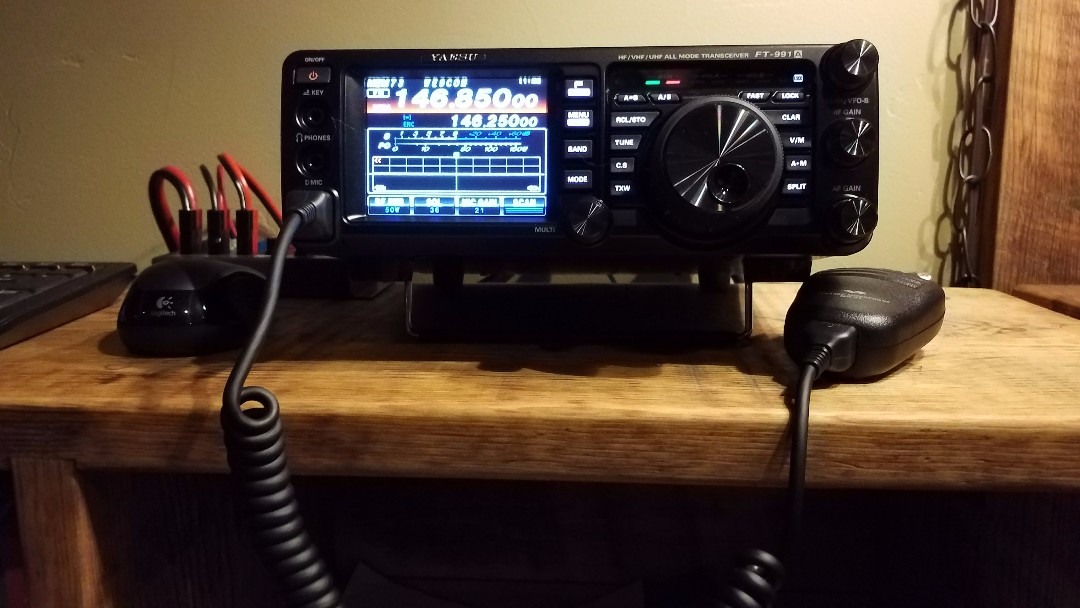
Yaesu FT-991A with GPS

I'm not sure why, but the Yaesu FT-991A does not come with a built-in GPS unit. So if you want that data included in digital QSO's, you will need to connect your own external GPS antenna. Now comes the Garmin GPS18x PC, a fully compatible NMEA GPS, WAAS enabled antenna that connects to the FT-991A's GPS/CAT DB9 serial port. Power is supplied by a 12 volt plug into my Yaesu FP-1030A power supply.
Setup is pretty simple with radio menu 028 set to GPS1, which is the the default setting. Plug it in, and turn it on. Wait, slow down. Did you get that?

Now when you key up on a C4FM repeater - as well as with a few other functions - your location/distance is also transmitted/received for the other stations. And if it makes your day, you get the cool little green GPS satellite icon showing up on the FT-991A touchscreen. Nice!

Update: Oct 2020 


With a Powerwerx PowerPole-to-cigar lighter adapter, I plugged this into my RIGrunner 4007U because I kept hitting the plug sticking out the front of the power supply. This GPS is working great!


Dec 12, 2017

Into the Future

As we get settled in to our new QTH, I find myself contemplating where and how I should set up my BWD-90 folded dipole antenna. Factors like the thick woods and metal 12/12 roof on our home, and the 55' tower behind it, makes finding a clear 110 feet not so easy. But wait, there may be an easy answer to this problem, like maybe the GAP Titan DX vertical antenna. As it goes, this was enough to open the box and look at other possibilities. Maybe its also time to look at digital amateur radio.

Long story short, a new GAP Titan DX is in the garage just waiting to talk to the world, and for the last couple days, I have been collecting data and programming the new Yaesu FT-991A and FTM-400XDR with all of the Wisconsin repeaters, now including digital and System Fusion repeaters. On the to-do list, need to get the Titan DX up and install the FTM-400XDR in the Jeep.


So far, I can say I am impressed with the YSF digital signal. I was listening to the Milwaukee W9RH YSF repeater last night and it was exceptionally clear and strong, and that repeater is just 20 watts. I can hardly wait to get on the air and try it out for myself. It would be nice to see more YSF repeaters out there with their dual analog/digital capability modes.