Showing posts with label C4FM. Show all posts

Sep 3, 2020

FT-7900R ZUM Repeater Build - Part 3


Over the last two weeks, I have been experimenting with various settings on the FT-7900R ZUM Radio Pi-Star repeater. After going through frequency calibrations, TX delay and TX/RX offset settings, I'm still having an issue with one particular thing.

The Problem


I have been unable to mitigate what seems to be a delay in the digital processing. This occurs after releasing the PTT of a transmitting radio. A short <1 second clip of the last transmission is heard coming back over the transmitting radio from the repeater. If you have ever heard a short-path long-path echo, you know what I'm trying to describe. It's more annoying than anything else, but something I'd rather not have happening, if at all possible.

Having gone through everything I could think of with the Pi-Star software settings (a short list for me), I began looking at hardware. Everything appeared to be working as it should, but then I had a light-bulb moment: "Maybe it really is a signal processing-induced delay."

Modification


The repeater is built around a Raspberry Pi 3 B+ that I once used as a desktop computer, even though it was pretty slow. When the Raspberry Pi 4 came out, I made the 3B to 4B change, and Wow! What a difference in performance! So if it made such a huge difference in a desktop environment, I wonder what it will do in a repeater controller environment. There's one way to find out.

A few minutes later, I had the Rpi 3 B+ disconnected from the ZUM Radio controller and replaced with a Raspberry Pi 4 B 2GB fitted with a full heat sink case and Argon programmable fan. I swapped out the Raspberry Pi OS card with a back-up copy of the Pi-Star repeater image and in under five minutes, the repeater was up and running.

Result


Almost any reasonable thing is worth trying when you are experimenting. For this repeater project, it has been a little of this. a little of that, old parts, spare parts, and a lot of fun. As for the Raspberry Pi 3 B+ to 4 B computer swap, I hear no perceptible difference with the original delay echo problem.

Hey, if nothing else, it looks like the blinking LED on the USB/Serial converter for the Nextion display is blinking a little faster, but that could just be me. So for now, I'll leave it with the Rpi 4 B and monitor the CPU temperature and Argon fan activation cycle frequency for a while.

New Hypothesis


Maybe the delay echo is caused by the collinear antenna setup feeding back, even running at very low power. I guess I'll find out when I get my frequency allocations from the Wisconsin Association of Repeaters and get a duplexer ordered, tuned, and installed.

Aug 15, 2020

FT-7900R ZUM Repeater Build - Part 2


October of last year I set out to make a MMDVM repeater with my Yaesu FT-7800 and FT-7900 transceivers. At the time, the setup was in simplex mode as I researched duplexers for the two frequency, one antenna system. And there the project sat in the shack just taking up space and collecting dust. With my invested time accumulating and the research folder growing thicker, I found several characteristics about my repeater build that I decided to change.

Enclosures and Heat


In the former computer case with all the components situated side by side, the homebrew repeater occupied a large footprint in the shack. Taking a second look at this, with the transceivers being the same size and short in height, stacking them greatly reduces the required footprint.

Since my components already have protective cases on them, placing everything into yet another case is unnecessary and only inhibits heat dissipation. In the stacked configuration with the receive radio on top, mounting them on a single Yaesu SMB-201 cooling fan will allow better open-air circulation as well as direct fan cooling to the bottom of the transmitting radio's heat sink.


Power


For now, I am keeping the repeater in the shack, so a second power supply is not needed. My Yaesu FP-1030A has more than enough capacity to run the repeater while also running my FT-991A, FTM-7250, and a few other accessories. If and when the time comes to move it out, I have a 23 amp power supply with an attached RIGrunner 4004U ready to go. This will not only power the two radios, but the RPi controller as well with it's two USB 5 volt ports. Handy dandy cotton candy!
Raspberry Pi Cooling

The Raspberry Pi 3B+ and ZUM Radio GPIO hat setup I originally made was satisfactory, but a passive cooling setup would be better. To fix this, I put the RPi in an aluminum heat sink case, added a programmable Argon One Artik fan hat on an extended GPIO, and placed the ZUM Radio board on top of that. I placed the Pi setup on it's side (GPIO edge down) to allow better natural airflow up the warm faces.

My three other Raspberry Pi 4B's require cooling so each have an Argon One fan, but in this 3B+ application it really isn't necessary, though it's a nice feature to have if things do get too warm. I programmed the fan to turn on at 42 degrees C at 10% speed. With this, the fan rarely activates, and then only briefly. The higher quality fan, reduced run time, and modified speed should greatly extend the life if this setup. After watching this setup for some time, I found the Pi temperature stays around 39 C with only passive cooling.

Here, the MMDVM repeater RPi is on the left of my shack's four-Pi setup. All computers are on a LAN switch to help reduce RF exposure in the shack.


Wiring Harness


One thing I don't like is having a harness that's too long or too short for whatever the project is, especially in the shack where extra wires can turn into interference-producing antennas. For this reason, I modified the harness and made two ends using two standard RJ45 jacks. The DIN cables were shortened to 16 inches and combined into a single RJ45. The repeater board connection was also joined to a single RJ45 jack. The two components now connect together with a standard computer network cable of whatever length is needed for the components' location. Perfect!


Antennas


The biggest change of plans may forgo the use of a duplexer and single antenna setup. Instead, I may go with a less expensive collinear setup using two Diamond X50 antennas mounted on separate tower standoff arms. I've been running a similar setup at 5 watts for a short time and found it works quite well. So far, I have one LMR400-fed antenna up and working on the tower arm.


Considering my location in a tall forested lakefront area widely known as a difficult corridor for RF, and having a tower only 55 feet tall, there is no point in spending a lot of money on any setup here. Besides, this is for experimentation and just having fun with RF. That's a big part of what this is all about, right?

Nextion Screen


Having all this figured out left me with a little unused creativity, so I redesigned my Nextion screen appearance and layout. Thanks to WA6HXG for the original Nextion 3.2 HMI file, I just moved a few things around, changed the fonts and background images, and called it a day. The colors in this photo are off, but you get the idea. Still on the to-do list are: (1) purchase and install the X50 antennas, and (2) receive frequency allocation from Wisconsin Association of Repeaters.


Oct 14, 2019

FT-7900R ZUM Repeater Build - Part 1


Here is a project involving a ZUM Radio duplex MMDVM and a Raspberry Pi 3 B+ combined with my trusty old Yaesu FT-7900 and FT-7800 radios, and a couple of mini-DIN cables. Together, a trial version of small digital all-mode repeater capable of full duplex D*Star, DMR, NXDN, P25, POCSAG, and Yaesu System Fusion should be the result. If this works out as expected, I will likely be seeking out an old GE Master II, or any other robust analog repeater, to handle whatever mode is selected.

Pins and Colors


So it's been a little while, and I finally figured it all out. Part of the problem I found was the Yaesu CT-39A mini-DIN wire color was incorrect for the pin location. So lets forget about colors and talk straight up pin number to pin number. Conduct a simple ohms test on your mini-DIN cable pins to determine what color goes to what pin (my Electronics-101 oversight...)

As stated on page 10 of the Yaesu FT-7900R user manual, the pins are identified by both number and function. Using this, combined with the pin information from the ZUM Radio, I found the following connections to work properly using one FT-7900R as a simplex digital mode repeater.


Note: Two wires on the CT-39A mini-DIN are not used: Yellow (RX1200), and second Black (shield ground).

The pins - looking at the back of the FT-7900R - are identified in the following locations. The locator tab will be at the bottom center.


Pin 1: top left - PKD (DATA IN)
Pin 2: top right - GND
Pin 3: middle left - PTT
Pin 4: middle right - RX9600
Pin 5: bottom left - RX1200
Pin 6: bottom right - PKS (SQL)


Keep in mind, this will transmit when anyone keys up on the WIRES-X, YSF, or FSC rooms you are connected to. Be sure to keep the power as low as possible for your needs, and share the air.

Now to get a repeater frequency allocation from the Wisconsin Association of Repeaters and get this working as a duplex repeater!

Pi Cooler


The Raspberry Pi ZUM repeater board gets a new case and a custom fan install to keep things nice and cool. This is a HiFiBerry box, which is tall enough to have a GPIO hat and a fan inside. I cut a 1.125" in the top and mounted a Pi fan inside, blowing directly down on the ZUM Radio hat and Raspberry Pi. Temps stay under 40 degrees C.


Repeater Case


There it was, down in the basement. A lonely old Windows computer that has seen it's better days. Perfect! I gutted all the hardware out, saved everything that was still good, and prepared the case to be converted into my new ZUM repeater box.


I was able to rewire the existing power supply to reduce the number of wires clumped together for the previous occupant of this case. Now I have 17 amps of 12 volts, 18 amps of 5 volts, and 11 amps of 3.3 volts available, all regulated and fan-cooled. This works out perfect for all my needs.

Getting everything positioned in the case is pretty easy, so long as the fans have coordinated air movement over the radios and through the case.


I'll need to fabricate a new front face plate to incorporate the two radio faces, a Nextion touch screen, the voltage and temp monitor, and the power switches. The Raspberry can be controlled via SSH, but a re-program of the Nextion screen can provide the shutdown capabilities I am looking for. It should work well and look pretty nice when it's all done.


Propagation Estimation


I found a tool online to help estimate propagation from the repeater's site at Radio Mobile Online. The parameters I used for the estimate are a 6 db vertical antenna at 55 feet on 146 MHz. This, of course, only gives a general idea of coverage. The actual specs will be used as soon as I get the frequency allocation from the Wisconsin Association of Repeaters.

This map is at 5 watts output. Since the goal is to serve the surrounding communities, I would like to keep the repeater at 5 watts to prolong the life of the FT-7900R driving the repeater, but a real-world test today around the area had the 5 watts barely making 5 miles; at 6 miles there was almost no squelch break on the Yaesu FTM-400XDR in the car. I was always told to expect one mile per watt on the ground, so I'm not really surprised. My Diamond X300 antenna, at 55 feet, is basically on the ground, here in the woods.


For comparison, I can hit the WE9COM repeater in Plymouth from my QTH using my FT-70D and FT-2D on 5 watts. The RFinder app lists this repeater as 14.1 miles from my QTH. This is 2.82 miles per watt. Here is an example of antenna height making all the difference.

Below is a map I made with a 5 mile, 10 mile, and 15 mile radius. If one watt per mile on the ground holds true, this map should be better aligned with real-world expectations and performance.


Sep 29, 2019

FT-70D on WIRES-X

To connect and control WIRES-X with your FT-70D, you first need to find the room or node numbers you would like to connect to at Yaesu's active Rooms and Nodes pages. All columns can be sorted. e.g. Sort by State to see rooms or nodes in your area.

If you are using a hotspot MMDVM, don't follow these instructions. See the information by Chris, K9EQ about this at hamoperator.com.


CONNECT - To connect to a WIRES-X repeater or node, select the frequency of the repeater or node, then press  MODE  until the DN mode is selected. Connect to WIRES-X by pressing   F   then  AMS .

SELECT - To connect to a room, rotate the  DIAL  until you get to the entry screen  EN # _ _ _ _ _ . Enter the room number and press  AMS 

STORE - After connecting to a room, store the room in one of five memory slots by pressing and holding the corresponding number of  1  2  3  4 , or  5 . A confirmation beep will sound.

CHANGE - To change between rooms stored in memory,  DIAL  to the room and press  AMS .

DISCONNECT - To disconnect from a room, press and hold  BAND . To disconnect from WIRES-X and return to normal radio operations, press and hold  MODE .

If you run into trouble, just disconnect and reconnect to WIRES-X.

And there you have it!

Download the PDF of these instructions.

Blessings!

Jun 26, 2019

DX vs. MMDVM


For a while now, its been a little tough to get regular DX the old-fashioned way. Aside from that, FT8 works fairly well on 20m, but that's not for everyone, and it pretty robotic and impersonal. There isn't enough people on HF DV like the FreeDV 1600 and 700D modes, so it's less than a thrill right now.

That being said, there is hope. There has been a tremendous increase of activity on the MMDVM front. With new gadgets hitting the market as fast as baby rabbits, even the Tech hams can now talk around the world, and on an HT to boot! Yeah, it's not like the traditional and personally rewarding "contacts" like we are used to, flexing our RF muscles in cunning and calculated ways, but the end result is the same. Hams talking to hams around the world, and how cool is that!

So my FT-991A isn't used quite as much right now for DX, but the FTM-400XDR and FT-70D are barking up a storm from my ZUMspot and a few connected Yaesu WIRES-X repeaters in the area. My favorites right now are America Link and MNWis. Ride the wave, baby! But if the internet goes down, make sure you are squared away in your own shack. Independence is highly rewarding!


Aug 6, 2018

Yaesu FT-991A with GPS

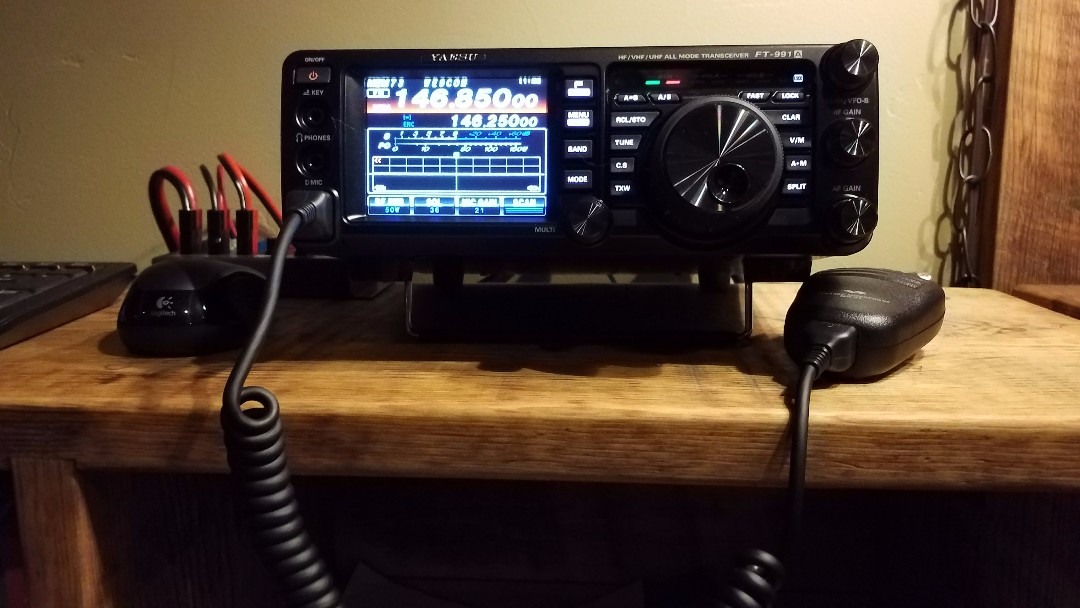
I'm not sure why, but the Yaesu FT-991A does not come with a built-in GPS unit. So if you want that data included in digital QSO's, you will need to connect your own external GPS antenna. Now comes the Garmin GPS18x PC, a fully compatible NMEA GPS, WAAS enabled antenna that connects to the FT-991A's GPS/CAT DB9 serial port. Power is supplied by a 12 volt plug into my Yaesu FP-1030A power supply.
Setup is pretty simple with radio menu 028 set to GPS1, which is the the default setting. Plug it in, and turn it on. Wait, slow down. Did you get that?

Now when you key up on a C4FM repeater - as well as with a few other functions - your location/distance is also transmitted/received for the other stations. And if it makes your day, you get the cool little green GPS satellite icon showing up on the FT-991A touchscreen. Nice!

Update: Oct 2020 


With a Powerwerx PowerPole-to-cigar lighter adapter, I plugged this into my RIGrunner 4007U because I kept hitting the plug sticking out the front of the power supply. This GPS is working great!


Jul 23, 2018

Here Spot!

As I said previously, my home, mobile, and HT radios are all Yaesu with but one exception, that being a recent purchase of a Tytera MD-390 HT for DMR.

For several years now, I have been gaining interest in VoIP and digital comms in general. A Yaesu HRI-200 WIRES-X node might be pretty cool, but to my understanding, I would have to dedicate a Windows computer and a Yaesu C4FM radio like my FTM-400XDR. That is a bit more investment than I am willing to commit to given I don't even know if I will like it, so I began searching out other VoIP solutions.

After a bit of research, I decided to purchase the ZUMspot RPi kit which includes the ZUMspot-RPi UHF board rev. 0.4, Raspberry Pi Zero Wireless, and a micro SD card programmed with the Pi-Star software image. I also bought a layered case to keep it all safe.


After getting it assembled into the case, and setting up the WiFi and software, my first impression  was, "This thing is awesome!" Talk about easy to set up, this was so quick and simple. And how does it work? Fantastic!

One of the first "rooms" I connected to was the FCS00290, America Link WIRES-X. Immediately I hear clear, crisp, full-quieting digital voice from fellow HAMs in Australia, Japan, England, and Wales. Very cool! The one problem I had, though, was feeling as though I was cheating or something. Having a QSO on the internet just isn't the same as a QSO using only my own equipment, but man, it sure is interesting. Effortless QSOs with people all over the world. Who'd a thought!

And the ZUMspot is smaller than a 1 inch cut-off from a piece of 2x4 stud! Totally awesome!

More later...

Dec 12, 2017

Into the Future

As we get settled in to our new QTH, I find myself contemplating where and how I should set up my BWD-90 folded dipole antenna. Factors like the thick woods and metal 12/12 roof on our home, and the 55' tower behind it, makes finding a clear 110 feet not so easy. But wait, there may be an easy answer to this problem, like maybe the GAP Titan DX vertical antenna. As it goes, this was enough to open the box and look at other possibilities. Maybe its also time to look at digital amateur radio.

Long story short, a new GAP Titan DX is in the garage just waiting to talk to the world, and for the last couple days, I have been collecting data and programming the new Yaesu FT-991A and FTM-400XDR with all of the Wisconsin repeaters, now including digital and System Fusion repeaters. On the to-do list, need to get the Titan DX up and install the FTM-400XDR in the Jeep.


So far, I can say I am impressed with the YSF digital signal. I was listening to the Milwaukee W9RH YSF repeater last night and it was exceptionally clear and strong, and that repeater is just 20 watts. I can hardly wait to get on the air and try it out for myself. It would be nice to see more YSF repeaters out there with their dual analog/digital capability modes.

Dec 6, 2017

Dusting off the HF

Yesterday I went down in the basement and retrieved the box containing my HF rig and paraphernalia. I brought the box up to my desk and took a look inside. After a few minutes, I closed the box and pushed it under my desk.

This morning, I decided to stop putting it off and get my HF stuff set up again. About two hours later, I had it all done. And there I sat, with no HF antenna up yet, I realized I may have wasted my morning. Before giving up, I decided to connect the 2M/440 antenna and make sure that worked. It didn't take long until I realized something wasn't working right.


I refreshed my memory by cruising through parts of the user's manual. Yup... Okay... Check. Still not sure, I downloaded the programming data from the radio so I could take a look at it. Yup... Okay... Nope. Doesn't look right. I imported updated repeater data to the RT Systems software, and then uploaded it to the radio. So, to make a long story shorter, the HF stuff is back in the box.

Not like it was a totally wasted day though. I took this opportunity to dust off my FT-7900, re-program it with my new data set, and got it up and running. Awesome!